Flowchart Studio
Design algorithms as flowcharts with the right symbol for every step, then use them to control machines.
Start something new
A blank flowchart, an example to take apart, or a machine to control.
Control a machine
Your flowchart runs a real machine on screen: the same symbols, and the machine does exactly what your chart says. 21 machines: Tiers 1 to 5, then the zoo.
Zoo machines
Machines that look after the animals at the zoo.
Learn it
About Flowchart Studio, and what schools get
A free online flowchart maker for schools
Flowchart Studio is where pupils design algorithms as flowcharts, using the standard symbol for every kind of step, and then walk through them to see whether the logic works. The same flowcharts can control a machine on screen: a lighthouse, a chicken coop door, a Mars rover. It runs in the browser on school desktops and Chromebooks, and nobody needs an account to use it.
What pupils can do with it
- The right symbols. Start and end, process, decision, input and output, joined by arrows that can be labelled Yes and No.
- Step through it. Walk the flowchart one shape at a time, choosing which way each decision goes: a dry run that shows where an algorithm goes wrong.
- Examples to take apart. An age checker, a counter loop and a temperature check show selection and iteration in action.
- Control a machine. Attach one of 21 machines to a flowchart and press Run: outputs switch on, sensors are read, and the scene does exactly what the chart says. Control systems teaching in the browser, with nothing to install.
- Check my machine. Each machine has a set of checks. Pupils see which parts work, with a hint for the first thing to fix.
Learn it, then prove it
A Learn page covers the symbols, sequence, selection and loops. Then pupils control 21 machines with their flowcharts, in Tiers 1 to 5 and then the zoo: from flashing a lighthouse lamp to a drone that holds its height and a rover that calls subroutines.
- Symbols and sequence (First go · 15 min)
- Input, output and variables (First go · 15 min)
- Age checker: your first decision (First go · 15 min)
- Nested decisions (Core · 20 min)
- Count-controlled loops (Core · 20 min)
- Condition-controlled loops and validation (Core · 25 min)
- Trace a flowchart (Core · 20 min)
- Subroutines (Core · 25 min)
- Lighthouse: your first machine (First go · 15 min)
- Firefly Jar: blink a light (First go · 12 min)
- Arcade Sign: light the letters in order (First go · 15 min)
- Rocket Launch: a countdown (Core · 15 min)
- Washing Machine: one stage after another (Core · 15 min)
- Fairground Carousel: speed up, hold, slow down (Core · 15 min)
- Hand Dryer: a decision on a sensor (Core · 15 min)
- Chicken Coop Door: dark or light? (Core · 15 min)
- Frost Alarm: warn when it freezes (Core · 15 min)
- Penalty Shootout: count the goals (Core · 20 min)
- Drone Hover: hold a height (Core · 15 min)
- Fish Tank: two sensors, two jobs (Core · 20 min)
- Reservoir Dam: keep the level safe (Core · 15 min)
- Mars Rover: name it once, use it again (Full tools · 25 min)
- Bubble Tea: a running total (Full tools · 25 min)
- Goat Feeder: feed the goats on a timer (Core · 15 min)
- Penguin Pool Chiller: keep the water cold (Core · 15 min)
- Paddock Gate: count the goats home (Full tools · 25 min)
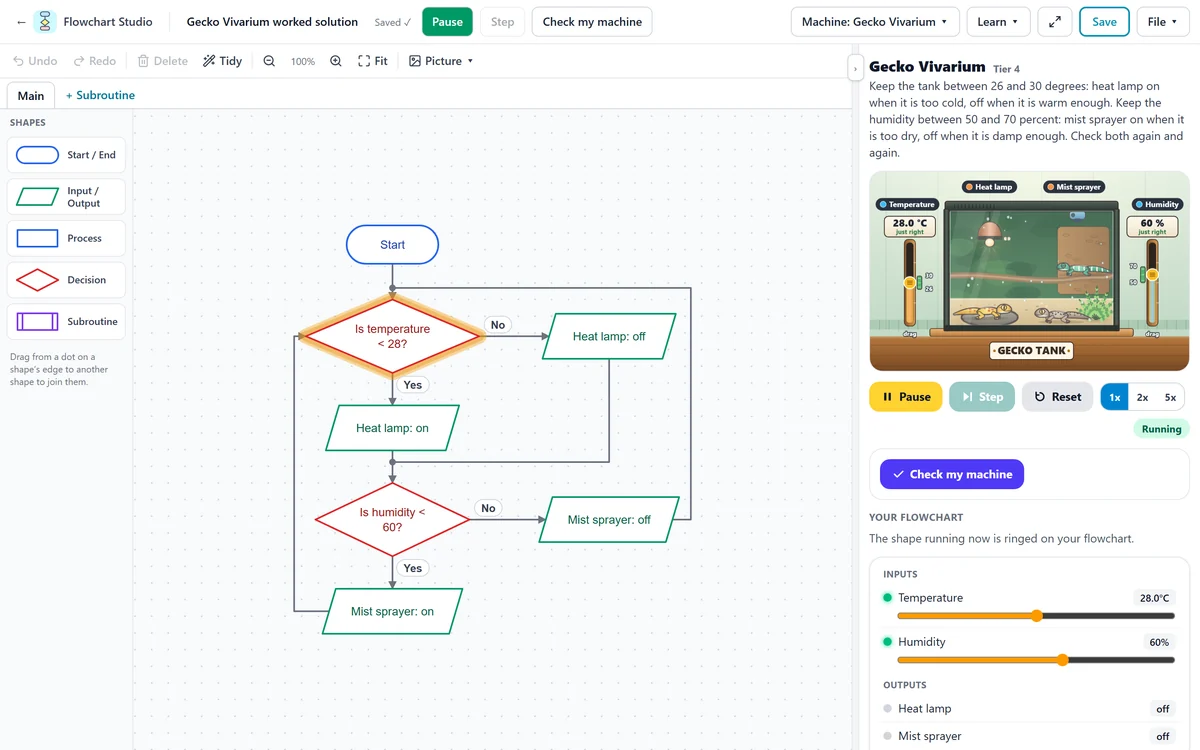
- Gecko Vivarium: keep the tank just right (Full tools · 20 min)
- Glasshouse Sprinklers: one decision inside another (Full tools · 25 min)
- Penguin Feeding Show: one subroutine, four penguins (Full tools · 30 min)
- Learn Flowcharts (Symbols, sequence, selection, loops)
- Control a machine (21 machines, Tiers 1 to 5 and the zoo)
For KS3 Computing and GCSE algorithms
Flowcharts are how pupils first meet algorithms at KS3, and GCSE Computer Science papers for OCR J277 and AQA ask pupils to complete, correct and write them. Flowchart Studio uses the symbols those papers use, so practice here carries straight into the exam.
Common questions
- Is it free, and do pupils need an account?
- It is free, with no account. A guest's flowchart is kept in their browser. Saving flowcharts to an account to come back to comes with a free 7-day trial or a school plan, and sign-in opens in a new tab so nothing is lost.
- Does it use the exam board flowchart symbols?
- Yes: the terminator for start and end, rectangles for processes, diamonds for decisions and parallelograms for input and output, as GCSE Computer Science papers use them.
- Can pupils use flowcharts to control things, as in control software?
- Yes. Pick a machine from the Machine menu and the flowchart drives it: output shapes switch motors and lights, decisions read sensors, and pupils change the sensors on the scene while it runs. It uses the same exam symbols as every other flowchart, so control work and algorithm work are one skill.
- Does it work on school computers and Chromebooks?
- Yes. It runs in the browser, so there is nothing to install.
- Can I set it as work and see what pupils make?
- With a school account, yes. Send it to every pupil's screen, launch it from a lesson or assignment so their flowchart is saved against it, and open any pupil's file to see it.
What a school account adds
Flowchart Studio stays free and is one of about twenty tools. A school account adds saved work that follows a pupil between devices, KS3 and GCSE Computing courses with algorithm question banks, and a dashboard showing where a class needs help.
Also free: the Logic Gate Studio, SQL Studio, online Python editor and every other free tool.