File handling and SQL
This worksheet marks itself
Set it as homework or classwork and every answer is marked as pupils go, with feedback on what they got wrong. The scores go straight into your mark book, so you can see who needs help before the next lesson.
- 12 questions
- 36 marks
- about 40 minutes
- marked instantly
Question types: short answer, multiple choice, true or false.
Try one from this worksheet
The text file log.txt already holds three lines. Identify the Python line that opens it so that new lines are added to the end and the three lines are kept.
Pick an answer: it's marked straight away, just as your pupils would see it.
About this resource
OCR GCSE Computer Science (J277) 2.2.3 Additional programming techniques: basic file handling (open, read, write, close) and the use of SQL to search for data. Python lesson 9 of 10 in 2.2 Programming fundamentals, with OCR Exam Reference Language beside the Python: a spot-the-mistakes Do Now, a…
18 slides.
Lesson outline
- Do Now: spot the 3 mistakes
- Do Now: answers
- Key idea: Write to a file: open, write, close
- Key idea: Read a file, one line at a time
- Quick check: the end of a line
- Key idea: Every line at once, and adding to the end
- Key idea: SQL: search a table
- Set 1: write, then read back
- Set 2: read every line
- Exam question E1: read a file of scores
- Model answer E1
- Exam question E2: refine an SQL statement
More from 2.2 Programming fundamentals · Python and OCR ERL lessons
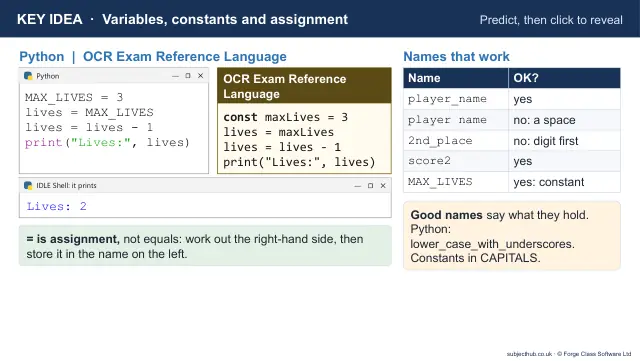
- Lesson pack · 2.2 L1Variables, constants, input, output and assignmentSubscription
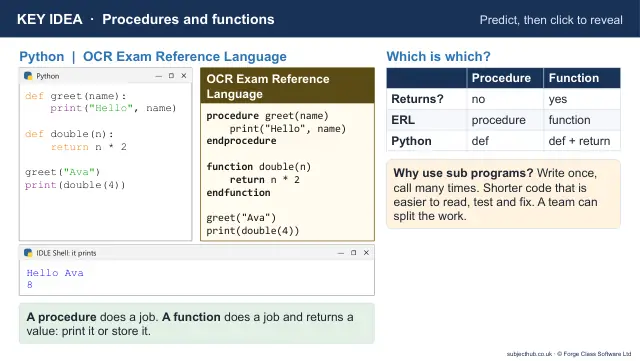
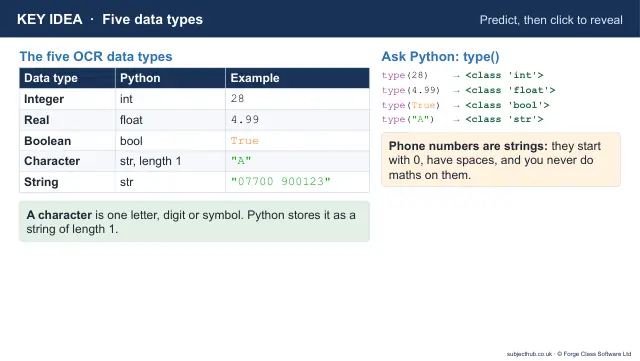
- Lesson pack · 2.2 L2Data types and castingSubscription
- Lesson pack · 2.2 L3Operators: arithmetic, comparison and BooleanSubscription
- Lesson pack · 2.2 L4Selection: if, elif, else, nested if and caseSubscription
- Lesson pack · 2.2 L5Iteration: count-controlled and condition-controlled loopsSubscription
- Lesson pack · 2.2 L6String manipulationSubscription
- Lesson pack · 2.2 L71D arraysSubscription
- Lesson pack · 2.2 L82D arrays and recordsSubscription