R093 · TA3 Pre-production planning · Lesson 12 of 16
Storyboards, scripts and wireframes: R093 revision
Revision notes for OCR Creative iMedia R093, spec point 3.3: what you need to know, the key terms, the mistakes that cost marks, and 6 free exam-style questions with their mark schemes.
What should a storyboard include?
A storyboard plans a moving-image product scene by scene. Each numbered frame has a sketch of the shot and notes on the shot type, camera angle and movement, timing, location, lighting, sound and the transition to the next frame. The director, camera operator and video editor all work from it, and the timings should add up to the length of the product.
Storyboards
A storyboard turns a script or an idea into a sequence of planned shots for a film, advert, music video, animation or game cut-scene. It lets the client approve the plan before money is spent on filming, and gives the crew clear instructions on the day, so nothing is forgotten and expensive reshoots are avoided.
Its conventions are numbered frames in order, a drawing of each shot, and the same technical details under every frame: shot type, camera angle, camera movement, duration, location, lighting, sound (dialogue, music, effects) and the transition. Equipment can be noted where it matters, such as a tripod for a steady shot. Its users are the director, the camera operator, the video editor and the client. It can be drawn on paper templates, with a graphics tablet, or in storyboard or presentation software, and some producers take photos on location instead of drawing.
An effective storyboard uses every convention consistently in every frame, has timings that add up to the required length, shows a clear sequence, and meets the brief, including anything the client said must appear, such as a logo at the end.
Scripts
A script sets out the words and directions for a film, television or radio programme, advert, podcast or game. Actors and presenters learn their lines from it, the director plans the performance with it, and the crew use it to prepare. Its conventions are a title page; scene headings in capitals showing interior or exterior, the location and time of day (for example INT. BAKERY KITCHEN - DAWN); short action descriptions in the present tense; character names in capitals above their dialogue; brief notes in brackets on how a line is delivered; and transitions such as CUT TO or FADE OUT. V.O. marks a voice-over and O.S. a voice heard off screen.
An audio script for radio or a podcast adds sound effect and music cues instead of pictures. Scripts are written in a word processor or screenwriting software.
Wireframes
A wireframe plans the layout and structure of a web page or app screen: where the navigation, images, text, buttons and links go, and what happens when the user interacts. Its conventions are a clear page structure (header, navigation, content areas, footer), boxes with a cross through them for images, lines or placeholder text for text blocks, labelled buttons, links and menus, notes on interactions such as 'opens the booking page', and white space. Annotations on colours, fonts and sizes can be added.
A wireframe is deliberately plain. It is about structure and how the page works, not decoration. The web developer builds from it, the web designer plans with it, and the client approves it. It can be sketched on paper or made in wireframing, graphics or presentation software. A wireframe that only sketches the content, with no navigation, links or interactions, is really doing a visualisation diagram's job.
Choosing the right document
- A video, advert, animation or music video: a storyboard, plus a script if there is dialogue or voice-over.
- A podcast or radio advert: a script. A storyboard is no use without pictures.
- A web page or app screen: a wireframe, with a flow chart to show how the pages link.
- A poster, cover or banner: a visualisation diagram.
Improving a storyboard for the camera operator
Exam questions give you a draft and ask you to improve it for a named user, often the camera operator. Typical problems in a draft are missing timings, a shot type on some frames but not others, a shot that cannot be filmed where it is set (an aerial shot inside a kitchen), a frame that is a graphic for the editor rather than something to film, and timings that do not add up to the length in the brief.
Fix each problem and annotate it for the user: 'Changed scene 5 from an aerial shot to eye level, because the camera operator cannot fly a drone over an indoor counter, and eye level shows the bread clearly.' Then check the whole board: every frame complete, timings adding up, and the brief's must-haves, such as the bakery's name at the end, in place.
How it comes up in the exam
The six design documents in spec point 3.3 were worth between 10 and 20 marks on each of the four papers we analysed. Nine-mark questions have asked candidates to discuss a storyboard for a video editor (the sample paper), to improve a storyboard for camera operators (January 2024), to improve a wireframe for a web developer (June 2024) and to discuss a script for a director (January 2025).
For how the long answers and pre-production documents are marked, see how R093 is marked.
Key terms
- Storyboard
- A frame-by-frame plan of a moving-image product, with the technical details of each shot.
- Shot type
- How much of the subject the frame shows, such as a close-up or long shot.
- Transition
- How one shot changes to the next, such as a cut, fade or dissolve.
- Script
- The written words and directions for a production.
- Scene heading
- The line that says where and when a scene happens, such as EXT. PARK - DAY.
- V.O.
- Voice-over: a voice heard over the pictures, not spoken on screen.
- Wireframe
- A plain plan of the layout, structure and interactions of a web page or app screen.
- Navigation
- The menus, buttons and links users move around a site or app with.
Common mistakes
- Storyboards with technical details on some frames but not all. Every frame needs the same conventions.
- Timings that do not add up to the length the brief asks for.
- Drawing a wireframe like a finished design. Show structure, navigation and interactions, not decoration.
- Choosing a storyboard for an audio-only product. A podcast or radio advert needs a script.
R093 storyboards, scripts and wireframes exam questions with answers
These are questions from SubjectHub's R093 bank, written in the style of the real paper. Try each one, then open the mark scheme. On SubjectHub they are marked automatically, written answers included.
- Question 1 · Matching[4 marks]
Match each product to the most suitable planning document.
- 1Animated short film
- 2App home screen
- 3Radio drama
- 4Brand visual style
- AWireframe
- BMood board
- CScript
- DStoryboard
Show the mark scheme
Animated short film → Storyboard
App home screen → Wireframe
Radio drama → Script
Brand visual style → Mood board
One mark for each correct match.
- Question 2 · Multiple choice[1 mark]
Which of the following is NOT a convention of a storyboard?
- AScene numbers
- BCamera shot labels
- CA diamond decision box
- DTimings for each scene
Show the mark scheme
Answer: C, A diamond decision box.
- Question 3 · Short answer[4 marks]
Identify four pieces of information that should be included on a storyboard for a video.
Show the mark scheme
Model answer: Scene numbers, timings, camera shot types, and scene content/images (also: camera movement, camera angles, lighting, sound, locations, transitions).
How the marks are given: 1 mark per valid element to a maximum of 4.
- Question 4 · Short answer[3 marks]
Identify three pieces of information included in a script for a video production.
Show the mark scheme
Model answer: Dialogue/speech, stage/action directions, and scene/location headings (also: character names, camera directions, sound cues).
How the marks are given: 1 mark per valid element to a maximum of 3.
- Question 5 · Short answer[2 marks]
Identify two conventions used on wireframes to represent content without drawing it in detail.
Show the mark scheme
Model answer: A box with a cross through it represents an image; lines or 'lorem ipsum' placeholder text represent text blocks (also: labelled rectangles for buttons/nav).
How the marks are given: 1 mark per valid convention to a maximum of 2.
- Question 6 · Improve a storyboard[9 marks]
Hearth Street Bakery wants a 20-second advert for local social media showing its bread being made fresh each morning, ending with the bakery's name. The owner has drafted a storyboard for the camera operator, but it is incomplete and some of the choices will not work.
The brief
Improve the effectiveness of the storyboard for use by the camera operator. The frame pictures are already in the draft. The advert must end with the bakery's name or logo on screen. The finished video must last about 20 seconds. You will get credit for: using the storyboard components and conventions consistently; a clear layout and sequence; and annotations that explain how your improvements help the camera operator in their role.
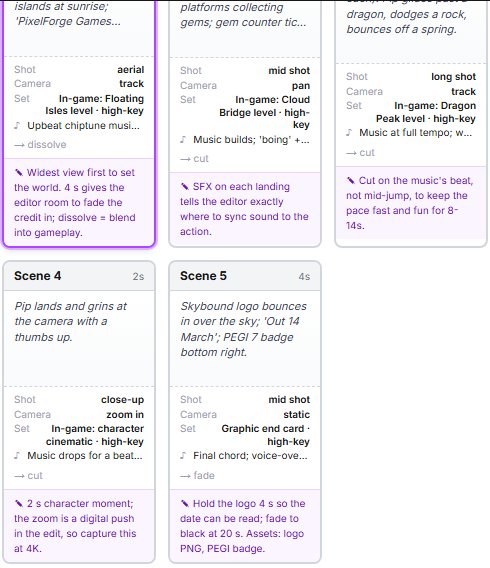
What a storyboard question looks like on SubjectHub. This one is a different brief, a game trailer, with an annotation under every frame. This is an interactive question: you build the storyboard in the browser and it is marked against OCR's levels in seconds, with feedback on what held the mark back. Pupils answer it through their school's SubjectHub account; teachers can try it, and set it to a class, with a free 7-day school trial.
Show what earns the marks
A strong answer could include: Every panel gets a shot type, camera angle, movement, timing, lighting, location, sound and transition, used consistently; equipment where it matters (tripod for the oven shot, slider for the kneading close-up). Scene 2: add its timing and lighting (warm practical light). Scene 5: replace the aerial angle (the operator cannot fly a drone over an indoor counter) with eye level or over-the-shoulder. Scene 4 is a price-list graphic made by the editor, not filmed: remove it or mark it for the editor. Note soft dawn light outside and warm light from the ovens inside; locations for every panel (kitchen, counter). Re-time to about 20 s and end on the logo bag held to camera. Annotations explain how each change helps the camera operator, e.g. 'Slider across the worktop, so the operator can move smoothly past the dough without a crew member in shot.'
Ready for a longer go? The free R093 mini-mock has a Section A and a Section B scenario in the shape of the real paper.