R093 · TA3 Pre-production planning · Lesson 13 of 16
Work plans, flow charts and asset logs: R093 revision
Revision notes for OCR Creative iMedia R093, spec points 3.1 and 3.3: what you need to know, the key terms, the mistakes that cost marks, and 6 free exam-style questions with their mark schemes.
What is a work plan in R093?
A work plan schedules a media project from start to finish. It breaks the project into phases (pre-production, production and post-production), tasks and activities, with timescales, the order of work (workflow), milestones, contingency time and the resources each task needs: hardware, software and people. It is often drawn as a Gantt chart, with a bar for each task.
The components of a work plan
- Phases: pre-production (planning), production (making) and post-production (editing and finishing).
- Tasks and activities: tasks are the jobs to be done, such as 'film the interviews'; activities are the smaller steps within them, such as setting up the lights.
- Workflow: the order tasks happen in, including dependencies, where one task cannot start until another has finished.
- Timescales: when each task starts and how long it takes, and the final deadline.
- Milestones: key checkpoints, such as 'client signs off the storyboard' or 'launch day'.
- Contingencies: spare time built in for things that go wrong, such as bad weather or a technical failure.
- Resources: the hardware (cameras, computers, lights), software (editing and design programs) and people (crew and freelancers) each task needs.
Why work plans are used
A work plan manages time, tasks, activities and resources, for one freelancer or a large team. It shows whether the deadline can be met before work starts. It stops clashes, such as two tasks needing the same camera or editor at once. It makes dependencies visible, so nobody starts editing before filming has finished. Milestones let the producer and client check progress and spot problems early, and contingency protects the deadline when something slips. Everyone can see what they are doing and when.
Building a work plan from a brief
R093 can ask you to create a work plan from a client brief, as the June 2024 paper did. These questions are marked by points, not levels: a mark for each requirement of the brief your plan meets. Read the brief line by line and turn every number and rule into the plan:
- Give every task exactly the duration the brief states.
- Put tasks in the order the brief requires, and never start a task before the one it depends on has finished.
- Run tasks side by side only where the brief allows it, and never more at once than it says the team can handle.
- Put contingency where the brief asks for it, such as two months before the deadline.
- Finish by the deadline and mark it as a milestone.
- Name every task clearly in the task column, because marks depend on the examiner being able to tell which row is which task.
Flow charts
A flow chart shows the steps, decisions and routes through a process or product: how a user moves around a website or app, the logic of a game, or what happens after each answer in an interactive quiz. Its conventions are standard shapes: an oval or rounded rectangle for start and end, a rectangle for a process or action, a diamond for a decision with labelled Yes and No exits, a parallelogram for input or output, and arrows for the direction of flow.
Developers, programmers and designers use flow charts to make sure every path is built and none leads to a dead end; clients use them to check how a product will work. They are made on paper or with diagram, presentation or flow chart software. An effective flow chart has one clear start, a labelled exit for every decision, consistent shapes and no loose ends.
Asset logs
An asset log records every asset used in a product: images, video clips, audio, music, fonts and text. For each one it notes the file name, the type and format, a short description, where it came from (the creator or the exact web address), when it was obtained, its copyright status and any licence or permission, any cost, how it will be used, and any edits made.
The log keeps a project legal, because it proves every asset is the team's own work or properly licensed. It also helps the team find files, credit creators, and replace an asset quickly if a licence turns out not to cover the use. The whole team uses it, especially the editor and producer. An effective asset log is complete and specific: 'Google Images' is not a source.
How it comes up in the exam
Work planning was worth between 0 and 6 marks on each of the four papers we analysed; in June 2024 it was a six-mark question to create a work plan from a brief, with marks for task durations, running only two tasks at a time, contingency and no overlaps. Flow charts and asset logs belong to spec point 3.3, which was worth 10 to 20 marks a paper across all six of its documents.
For how the long answers and pre-production documents are marked, see how R093 is marked.
Key terms
- Work plan
- A schedule of a project's tasks, timescales, milestones, contingency and resources.
- Gantt chart
- A chart with a bar for each task across a timeline, often used to show a work plan.
- Workflow
- The order tasks happen in, including which depend on others.
- Milestone
- A key checkpoint in a project, such as client sign-off or launch.
- Contingency
- Spare time or a backup plan in case something goes wrong.
- Resources
- The hardware, software and people a task needs.
- Dependency
- When one task cannot start until another has finished.
- Flow chart
- A diagram of the steps, decisions and routes through a process or product.
- Asset log
- A record of every asset used, its source and its copyright status or licence.
Common mistakes
- Leaving out contingency, or putting it somewhere the brief did not ask for.
- Running dependent tasks at the same time, such as editing before filming has finished.
- Using the wrong flow chart shape for a decision. Decisions are diamonds with labelled exits.
- Writing 'internet' or 'Google' as the source in an asset log. Give the exact source and the licence.
R093 work plans, flow charts and asset logs exam questions with answers
These are questions from SubjectHub's R093 bank, written in the style of the real paper. Try each one, then open the mark scheme. On SubjectHub they are marked automatically, written answers included.
- Question 1 · Multiple choice[1 mark]
Put the project phases in order: A) post-production, B) pre-production, C) production, D) distribution.
- AB, C, A, D
- BC, B, A, D
- CB, A, C, D
- DD, B, C, A
Show the mark scheme
Answer: A, B, C, A, D.
- Question 2 · Matching[4 marks]
Match each flow chart shape to its meaning.
- 1Oval/rounded rectangle
- 2Rectangle
- 3Diamond
- 4Arrow
- AProcess/step
- BDecision
- CStart or end
- DDirection of flow
Show the mark scheme
Oval/rounded rectangle → Start or end
Rectangle → Process/step
Diamond → Decision
Arrow → Direction of flow
One mark for each correct match.
- Question 3 · Short answer[4 marks]
Identify four components, other than milestones, that are used in a work plan.
Show the mark scheme
Model answer: Tasks, activities, durations/timescales, and contingencies (also: resources, deadlines, workflow/task order).
How the marks are given: 1 mark per valid component to a maximum of 4: tasks, activities, durations, timescales, deadlines, contingency, resources, workflow.
- Question 4 · Short answer[2 marks]
Explain one benefit of including milestones in a work plan.
Show the mark scheme
Model answer: Milestones mark key points to check progress (1), so the team knows early if the project is falling behind schedule (1).
How the marks are given: 1 mark for progress checkpoints; 1 mark for the benefit (early warning, client updates, motivation).
- Question 5 · Short answer[2 marks]
Explain one reason for keeping an asset log during a media project.
Show the mark scheme
Model answer: It records where every asset came from and its usage rights (1), proving the project does not breach copyright (1).
How the marks are given: 1 mark for recording sources/permissions; 1 mark for the legal/copyright benefit.
- Question 6 · Build a work plan[7 marks]
Create a work plan for producing a 4-episode podcast series.
The brief
Your podcast series of four episodes launches at the end of month 6. Plan these tasks: • Research and scripting: 2 months. This comes first. • Recording the episodes: 1 month. Recording cannot start until all the scripts are finished. • Editing the episodes: 1 month. The presenter records and edits the episodes herself, so she cannot start editing until recording is finished. • Cover artwork: 1 month, by a freelance designer. The designer needs the episode titles from the scripts, so this cannot start until scripting is finished, and it must be ready before promotion starts. • Contingency: 1 month straight after editing, to re-record or fix any episode. • Promotion: month 6 only, immediately before the launch. Mark the launch at the end of month 6 as a milestone.
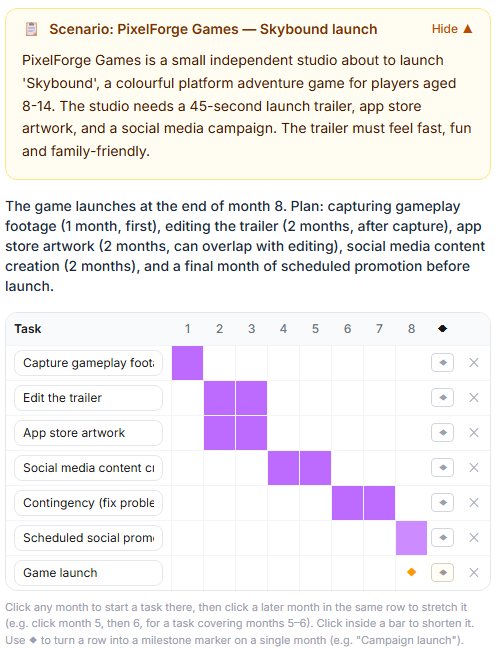
What a work plan question looks like on SubjectHub. This one is a different brief, a game launch, with the tasks placed on a month-by-month grid. This is an interactive question: you build the work plan in the browser and it is marked point by point against the brief, the way OCR marks work plans, in seconds, with feedback on what held the mark back. Pupils answer it through their school's SubjectHub account; teachers can try it, and set it to a class, with a free 7-day school trial.
Show what earns the marks
A strong answer could include: Research and scripting months 1-2; recording month 3; editing month 4; contingency month 5; promotion month 6 only; cover artwork any one month from 3 to 5 (after scripting, before promotion); launch milestone at the end of month 6.
Ready for a longer go? The free R093 mini-mock has a Section A and a Section B scenario in the shape of the real paper.