SHSubjectHub

Smart, Safe & Responsible Online quiz games for KS3 Computing

5 live games for KS3 Computing, 75 questions. Free for teachers, up to 40 players.

Smart, Safe & Responsible Online for KS3 Computing: 5 ready-made live quiz games, 75 questions in all.

The questions cover Privacy settings, Cyberbullying, Privacy Settings, Digital Footprint, Digital Citizenship and Reliable Information.

There are 2 quickfire rounds, 2 picture rounds and 1 practice set. Question types: 38 multiple choice, 33 true or false and 4 fill the gap. 45 questions have a picture.

Pick a set, put the join code on the board and pupils play on their phones. Pupils need no account. Free for teachers, up to 40 players.

The gamesEach set is a fixed list of questions. Open a preview to see a few of them.

Quickfire: Smart, Safe & Responsible Online

KS315 questions· Warm-up

Plays in 17 of 17 game modes, including Gold Rush, Big Catch and Speed Blitz.
Preview 3 sample questions
  1. 1

    True or false?

    Privacy settings can control who is able to message you directly.
  2. 2

    Digital footprints: true or false?

    Only things you post yourself count towards your digital footprint.
  3. 3

    Digital footprints: true or false?

    Using someone else's photo or music without permission could break copyright law.

+ 12 more questions in the game.

Practice

Smart, Safe & Responsible Online: Cyberbullying

KS315 questions· Core

Plays in 17 of 17 game modes, including Gold Rush, Big Catch and Speed Blitz.
Preview 3 sample questions
  1. 1

    True or false?

    Amina spreads a rumour about a classmate that isn't true, to a group of friends online.
  2. 2

    True or false?

    Harvey sees an unkind message sent to a classmate, screenshots it, and shows a trusted adult.
  3. 3

    True or false?

    Sofia shares an embarrassing video of a friend without asking them, because she thinks it's funny.

+ 12 more questions in the game.

Quickfire: Privacy settings

KS315 questions· Warm-up· all pictures

Plays in 13 of 17 game modes, including Gold Rush, Big Catch and Fossil Hunt.

Preview 3 sample questions
  1. 1
    A mock privacy settings screen

    Picture: Forge Class Software Ltd

    True or false?

    Anyone can message this account.
  2. 2
    A mock privacy settings screen

    Picture: Forge Class Software Ltd

    True or false?

    Anyone can message this account.
  3. 3

    Which screen keeps your posts private?

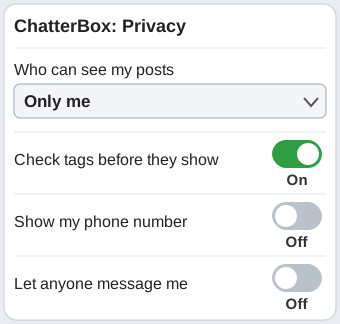
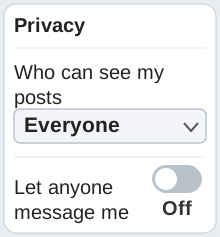
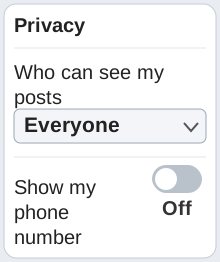
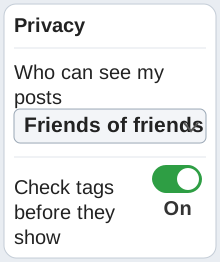
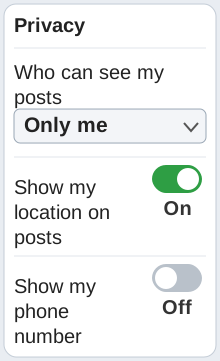
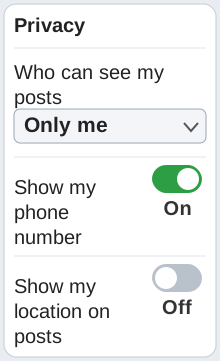
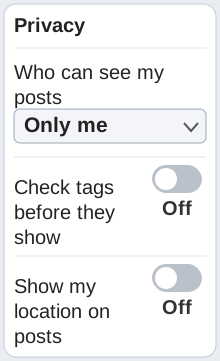
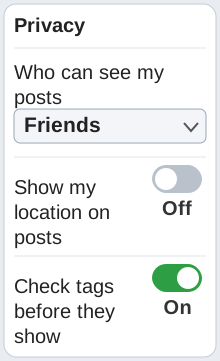
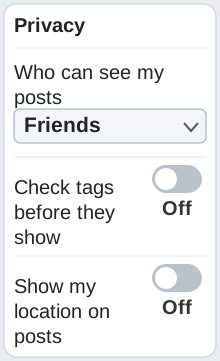
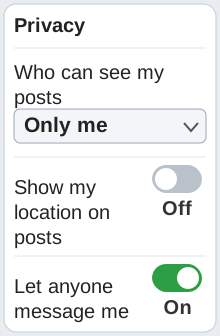
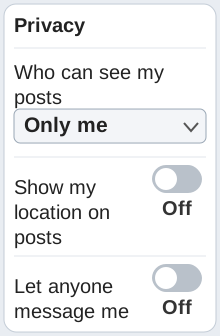
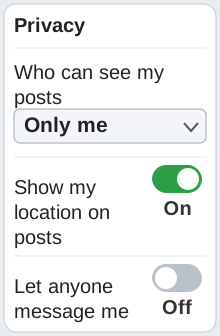
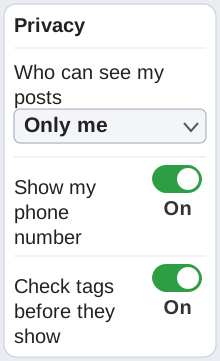
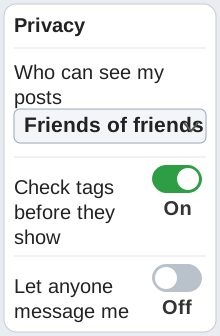
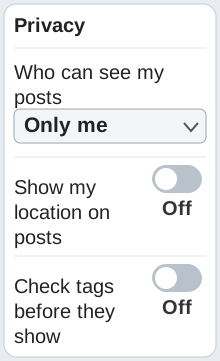
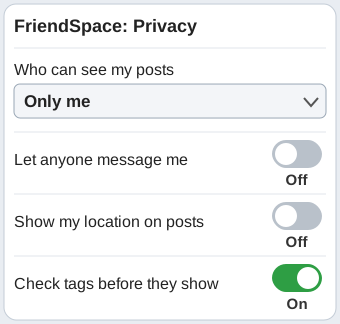
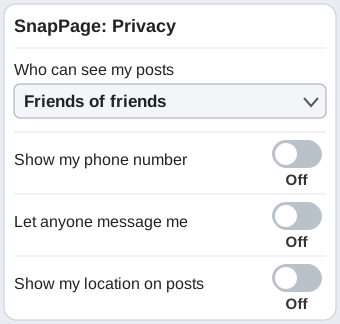
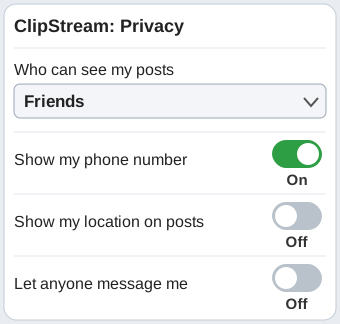
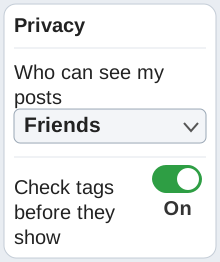
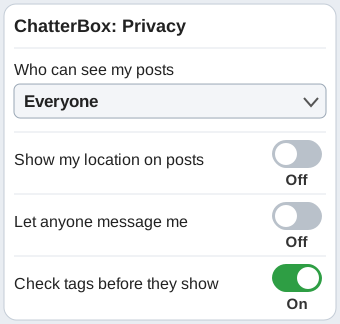
    A mock privacy settings screenA mock privacy settings screenA mock privacy settings screenA mock privacy settings screen

+ 12 more questions in the game.

Picture round: Privacy settings

KS315 questions· Core· all pictures

Plays in 13 of 17 game modes, including Gold Rush, Big Catch and Fossil Hunt.

Preview 3 sample questions
  1. 1

    Which settings screen is the safest?

    A mock privacy settings screenA mock privacy settings screenA mock privacy settings screenA mock privacy settings screen
  2. 2

    Which settings screen is the safest?

    A mock privacy settings screenA mock privacy settings screenA mock privacy settings screenA mock privacy settings screen
  3. 3

    Which settings screen is the safest?

    A mock privacy settings screenA mock privacy settings screenA mock privacy settings screenA mock privacy settings screen

+ 12 more questions in the game.

Picture round: Privacy settings, set 2

KS315 questions· Core· all pictures

Plays in 13 of 17 game modes, including Gold Rush, Big Catch and Fossil Hunt.

Preview 3 sample questions
  1. 1
    A mock privacy settings screen

    Picture: Forge Class Software Ltd

    Who can see the posts on this account?

    Friends onlyEveryoneFriends of friendsOnly me
  2. 2
    A mock privacy settings screen

    Picture: Forge Class Software Ltd

    Which setting on this screen is risky?

    Let anyone message meShow my phone numberWho can see my postsShow my location on posts
  3. 3
    A mock privacy settings screen

    Picture: Forge Class Software Ltd

    Which setting on this screen is risky?

    Who can see my postsShow my phone numberLet anyone message meShow my location on posts

+ 12 more questions in the game.

How hosting works

  1. Pick a set and a game mode. The questions stay the same; the game changes.
  2. Put the join code on the board. Pupils join at subjecthub.co.uk/play on a phone or laptop. They need no account.
  3. Play for 1 to 7 minutes. You choose the length before you start.

Free for teachers: host these sets with up to 40 players. You sign up once as a teacher.

See how each game mode plays →

← All KS3 Computing games · All live games