Start something new
Start blank, take apart an example, plan from a brief, or fix a broken storyboard.
Learn it
Practise R093
OCR Creative iMedia exam questions, answered in this editor. Free check for everyone; sign in for the full mark.
About Storyboard Studio, and what schools get
A free online storyboard maker for students
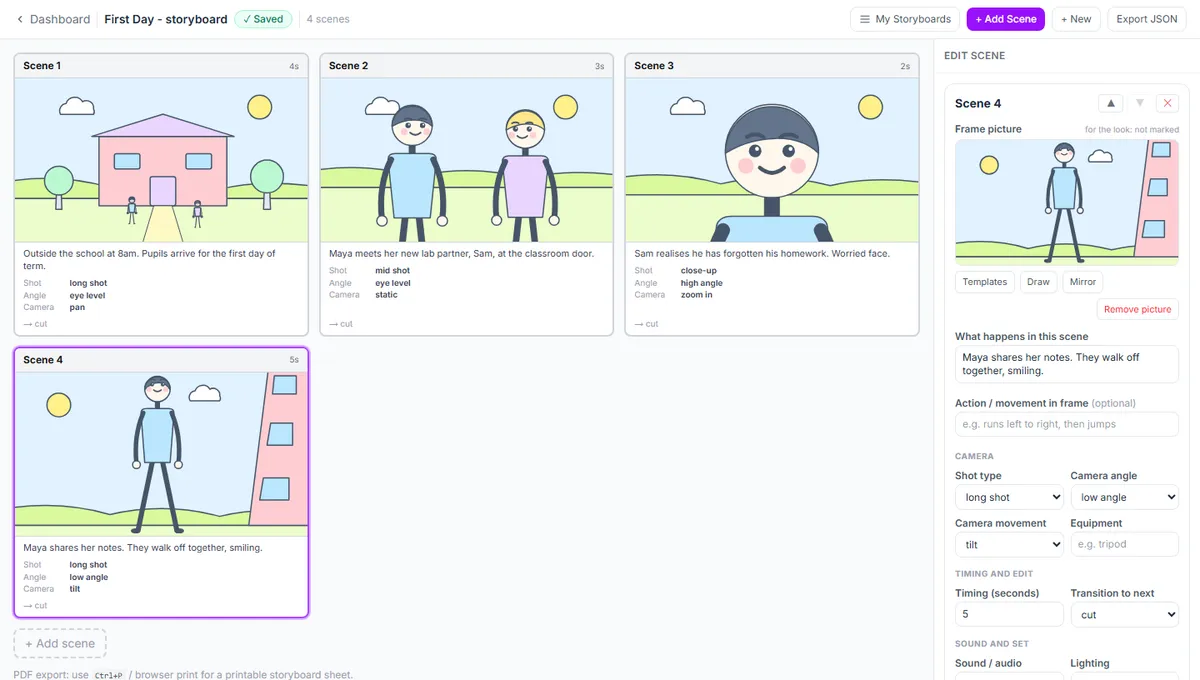
Storyboard Studio is where pupils plan a video, animation or advert scene by scene. Each frame has a picture and the details a real storyboard records: shot type, camera angle, camera movement, timing, transition, sound, lighting, location and equipment. It runs in the browser on school desktops and Chromebooks, and nobody needs an account to use it.
What pupils can do with it
- Build every frame. The frame builder sets the scene once from backgrounds, people and props. Pick a shot type and camera angle and the picture re-frames itself, from extreme close-up to bird's-eye, with arrows for camera moves. Or sketch straight onto the frame.
- Use the right terms. Pick shot types, camera angles (eye level, high, low, aerial, Dutch) and camera moves (pan, tilt, zoom, track, dolly, crane, handheld) from lists, so the vocabulary is always correct.
- Plan to the brief. Add the brief and the running time it asks for. A timeline shows every scene's length against the target, so the timings add up.
- Record the rest. Transitions, sound, lighting, location, equipment, action in the frame and notes, scene by scene.
- Download a PDF. A4 landscape with three frames a page, every frame with its picture and all its details, ready to print or hand in.
- Practise for the exam. Exam-style tasks give a draft storyboard and a user to improve it for, such as the camera operators, the way the R093 paper does.
Made for Creative iMedia R093
Storyboards are one of the pre-production documents in R093 (Creative iMedia in the media industry), and the exam asks pupils to read and complete them. Storyboard Studio uses the same conventions and reminds pupils that a storyboard needs at least four scenes. Media studies and film units use it too.
Common questions
- Do pupils need to be good at drawing?
- No. The frame builder draws each frame from ready-made backgrounds, people and props, and re-frames it when they change the shot type or angle. Pupils who like to draw can sketch on the frame instead.
- Is it free, and do pupils need an account?
- It is free to use, with no account. Saving storyboards to an account to come back to comes with a free 7-day trial or a school plan, and sign-in opens in a new tab so nothing is lost.
- What should a storyboard include?
- A sketch of each shot, plus the shot type, camera angle and movement, how long the shot lasts, the transition, and any sound or dialogue. Storyboard Studio has a field for each, so nothing is forgotten.
- Can pupils practise the R093 storyboard question?
- Yes. Exam-style tasks give a draft storyboard to improve for a named user, such as the camera operators, and check that each technique is used on every panel that user needs.
- Does it work on tablets?
- Yes. It runs in the browser, and the sketch pad works with a finger or a stylus as well as a mouse.
- Can I set it as work and see what pupils make?
- With a school account, yes. Send it to every pupil's screen, launch it from a lesson or assignment so their work is saved against it, and open any pupil's storyboard to see it.
What a school account adds
Storyboard Studio stays free and is one of about twenty tools. A school account adds saved work that follows a pupil between devices, Creative iMedia courses and R093 exam practice, and a dashboard showing where a class needs help.
Also free: the how to make a storyboard guide (with a free template), camera shots and angles guide, R093 storyboard exam question guide, R093 storyboards revision page, Mind Map Studio, Comic Studio and every other free tool.